Rate surcharges: weekend, holiday and night pay rates
On this page
Quick answer
Weekend and night pay rates are set as Rate surcharges in My Company › Bonuses & surcharges. Each rule adds a percentage of the hourly rate, or a fixed amount per hour, to Saturday, Sunday, public holiday, night or overtime hours, or to work at one branch or project. Exceptions for one employee go on their Salary tab.
#What it's good for
- Weekend, holiday and night hours are costed correctly without working them out by hand.
- One company rule covers everyone; a single employee can have a different value or none.
- A site allowance – for example 1.50 EUR per hour at a clinic – applies only to hours on that project.
- Rules have start and end dates, so a seasonal premium ends on its own.
#Who it's for
A good fit for
- Cleaning, hospitality and production teams that work evenings, nights and weekends.
- Companies that pay a premium for particular sites or clients.
Not the right fit for
- Employees on a fixed monthly salary: surcharges don’t apply while that salary is active – see Hourly rate and salary.
- One-off or monthly amounts (a performance bonus, a deduction) belong in Bonuses, not here.
#Step by step
-
Open the company surcharges.
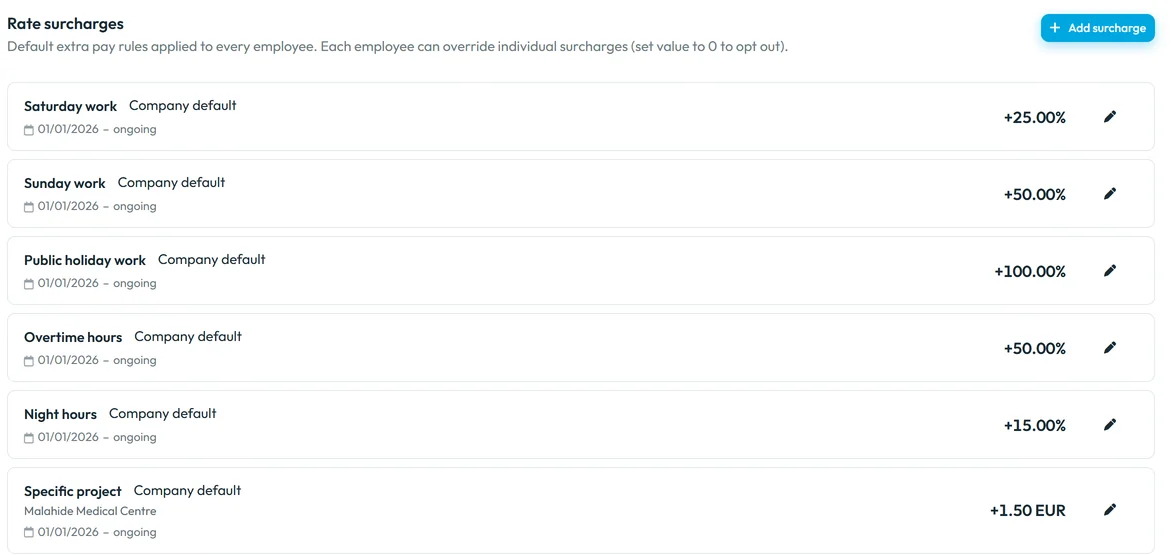
Go to My Company › Bonuses & surcharges and find Rate surcharges:
Default extra pay rules applied to every employee. Each employee can override individual surcharges (set value to 0 to opt out).
Each rule shows what it applies to, the label Company default, its validity and the value.Brightway Facility Services pays +25 % on Saturday, +50 % on Sunday, +100 % on public holidays, +50 % for overtime hours, +15 % for night hours and +1.50 EUR per hour at Malahide Medical Centre.
Company rules apply to everyone -
Add a rule.
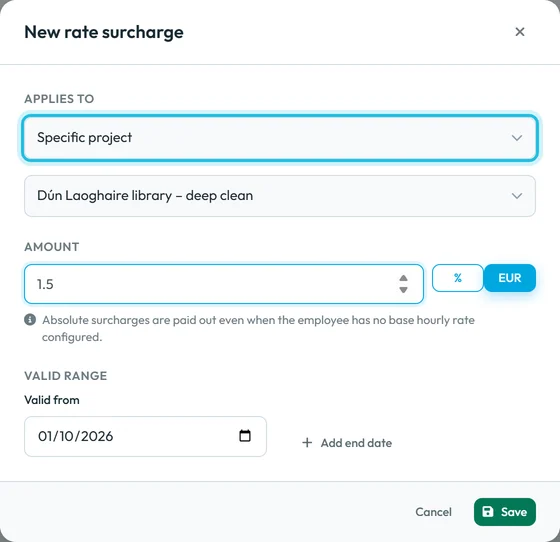
Click Add surcharge. In Applies to choose one of Saturday work, Sunday work, Public holiday work, Night hours, Overtime hours, Specific branch or Specific project. For a branch or project, pick which one.
Enter the Amount – a percentage of the base hourly rate or a fixed amount per hour – and the Valid from date. A negative value turns the rule into a Deduction. Save.
Surcharge for one project -
Check which hours count as night.
Night hours follow the company’s night window set under Night Shift – see Night shifts. Set that window before you add a night premium.
-
Make an exception for one employee.
Open the employee’s Salary tab. Under Rate surcharges (
Extra pay rules that stack on top of the base hourly rate.
) the company rules are listed with Company default. Click Add surcharge and create a rule of the same kind with the employee’s value. It is marked Employee override – Replaces company default, and the company rule shows Replaced by employee override. Set the value to 0 to exclude the person from that surcharge. -
Check the result.
The surcharge form shows the Resulting rate at current base salary, so you see the hourly rate the rule leads to. The labour costs in Table Reports include the surcharges.
#Related pay settings
- The base ratePercentages are taken from the employee’s hourly rate – see Hourly rate and salary.
- Counting overtimeWhich hours are overtime hours is decided by the overtime rules – see Overtime.
- Fixed amounts per monthA fixed sum for a full month or a reached hours threshold is an automatic bonus rule – see Bonuses.
#Special cases and tips
- A rule has no effect
- The employee has a fixed monthly salary. The rule then shows
A fixed monthly salary covers this rule's whole validity period — it won't have any effect.
- No surcharge appears in the costs
- Check that the employee has an hourly rate (percentages need one), that the rule is valid on those days and that there were matching hours.
- A premium only for the summer
- Give the rule an end date. It stops applying after that day; earlier months keep it.
- Different premiums for different sites
- Add one Specific branch or Specific project rule per site.
#Frequently asked questions
Does FreshQR apply legal minimum premiums?
No. It uses the values you enter. Check your contracts and local rules and set the rates to match.
Can a surcharge be a fixed amount instead of a percentage?
Yes. Enter an amount per hour, like the 1.50 EUR site allowance in the example.
How do I exclude one employee from the Sunday premium?
Add a Sunday work surcharge on their Salary tab with the value 0.
Do surcharges change the hours in reports?
No. Hours stay the same; surcharges only change the costs.
#Related
You are hereRate surcharges for weekends, holidays and nights
Web app (administrator)Mobile app (employee)