Night shift hours and attendance past midnight
On this page
Quick answer
FreshQR counts night shift hours automatically. The Night Shift setting in General Settings defines the night window, 22:00 to 06:00 by default. Any part of an attendance record inside that window is shown as night hours in the reports, and a night pay rate can be based on it. A shift past midnight is simply one record.
How to turn it on
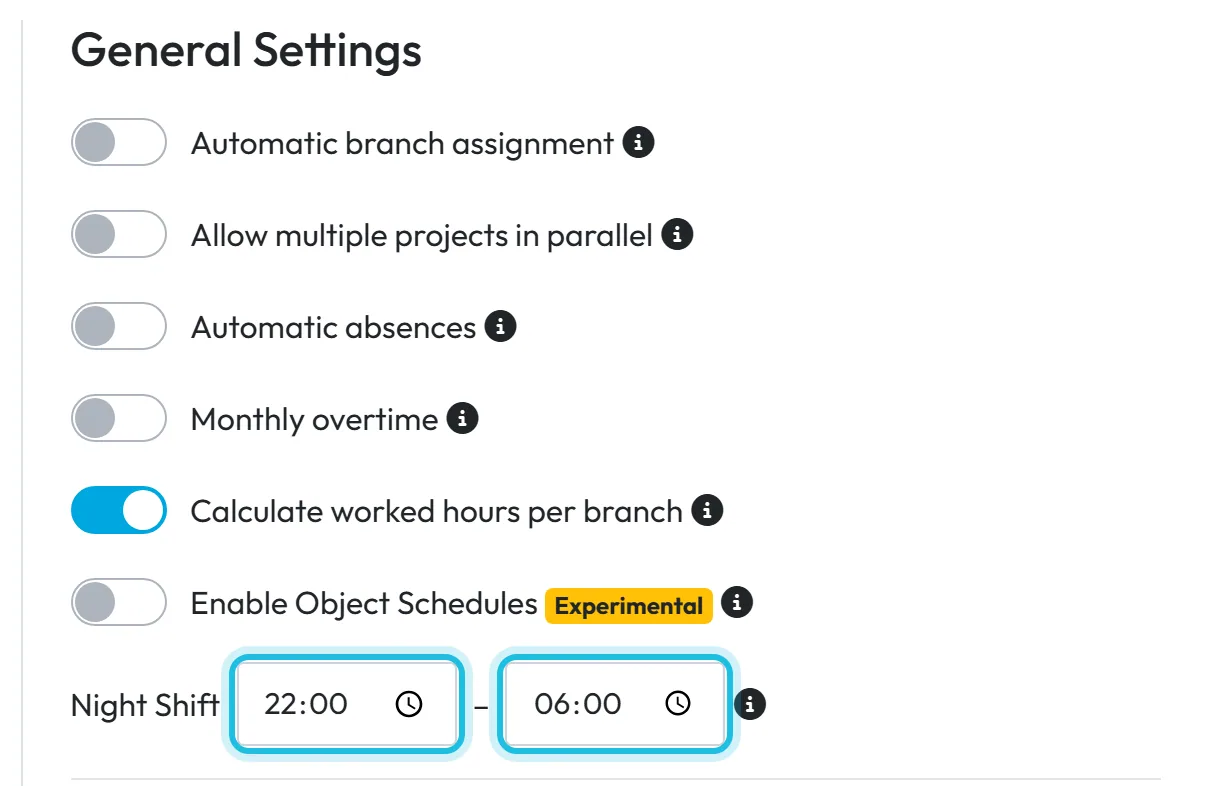
The night window is set to 22:00–06:00 from the start, so night hours are counted without any setup. Change the two times if your night period is different, then save. The hint says: Leave empty to disable night shift calculation. Night shift should cross midnight (e.g., 22:00 - 06:00)
.
- My Company
- Company Details
- General Settings
- Night Shift
- Who can turn it on
- The Owner, Administrators and the role Company Settings: View & Edit.
- What changes
- Night hours appear separately in the reports. Employees scan exactly as before – there is no special night QR code.
- Applies to
- The whole company. There is no separate night window per branch or per employee.
#What it's good for
- Night hours are separated from day hours without anyone adding them up.
- A shift from 21:55 to 05:35 stays one record – nobody has to scan at midnight.
- A night pay rate is calculated from the same window, so payroll and reports agree.
#Who it's for
A good fit for
- Evening and night cleaning crews, security, care, bakeries and production running at night.
- Hospitality with late closing, where part of the shift falls after 22:00.
Not the right fit for
- Companies that never work in the evening. The setting does no harm; you’ll simply never see night hours.
#Step by step
-
Check the night window.
Go to My Company › Company Details and find Night Shift under General Settings. The two time fields show the start and end of the night period. Despite the name, this isn’t a type of shift – it is the period of the day whose hours count as night work. Shift types are created in the shift planner, see Shift planner templates.
-
Change it if needed, and save.
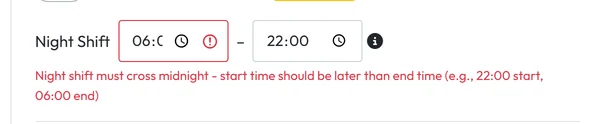
Enter the start and end – the start must be later than the end, because the window crosses midnight. If it doesn’t, the field shows
Night shift must cross midnight - start time should be later than end time (e.g., 22:00 start, 06:00 end)
.
The night window must cross midnight -
Let the team scan as usual.
Night staff scan Clock in at the start and Clock out in the morning, the same as everyone else. In Scan Details a shift from 21:55 to 05:35 the next morning is one record with one duration. See Scan details.

A shift past midnight is a single record -
Find the night hours in the reports.
In Table Reports › Calendar the night hours have their own row type, Night. Pick it in the Row types menu if it isn’t shown. See Table reports – tabs and filters.

Night hours appear in their own Night row


#Related settings
- Pay a night rateA rate surcharge for Night hours adds a percentage or a fixed amount per night hour – for example +15 % at Brightway Facility Services. It uses this night window. See Rate surcharges for weekends, holidays and nights.
- Switch the calculation offClear both time fields and save. Night hours are then no longer counted separately.
#Special cases and tips
- A forgotten clock-out after a night shift
- For night teams, an auto-close rule with Close flexibly after worked hours is safer than a fixed evening time, which could close a shift that has only just started. See Automatic Departure Closure.
- Overtime is a separate number
- Night hours say when someone worked; overtime says how much more than the schedule they worked. Each has its own figure in the reports. See Overtime.
- Shift planner templates
- If you plan shifts, give the night shift its own template, for example 22:00 to 06:00 – a template can cross midnight. Its breaks and overtime rules then fit the night. See Shift planner templates.
#Frequently asked questions
Do I need a special QR code for night shifts?
No. Night staff scan the usual Clock in and Clock out codes.
Can different branches have different night hours?
No. The night window applies to the whole company.
Does someone working past midnight have to scan twice?
No. One clock-in in the evening and one clock-out in the morning make one record.
What is the default night window?
22:00 to 06:00. You can change it or clear it in General Settings.
#Related
You are hereNight shifts and attendance past midnight
Web app (administrator)Mobile app (employee)