Contract end date reminders for fixed-term staff
On this page
Quick answer
A contract end date reminder needs two things. Enter the Contract end date in the employee’s profile, and switch on the Employment contract ending rule in My Company › Notifications with the number of days in advance. FreshQR then e-mails you before the date and on the day, and flags the person in the employee list.
How to turn it on
Contract end dates are stored as soon as you enter them, but the warnings and e-mails come only from the e-mail rule Employment contract ending. It is off until you switch it on. Open My Company and click the Notifications tab, switch the rule on, choose the recipients and enter the days in advance (30 by default), then save.
- My Company
- Notifications
- Employment contract ending

- Who can turn it on
- Accounts that can change company settings: the Owner, Administrators and Company Settings: View & Edit.
- What changes
- Recipients get an e-mail the chosen number of days before each contract ends and another on the day. The employee list shows icons and a banner, and the Employees menu item gets a badge. Nothing changes in the employees’ app.
- Applies to
- The whole company. The date itself is set per employee.
#What it's good for
- Fixed-term contracts no longer end quietly. You hear about them weeks ahead, in time to decide whether to extend them.
- Seasonal and trial-period staff are flagged in the employee list, so the office sees them every time it opens the list.
- Supervisors can get the reminder for their own people through the Direct supervisor recipient.
#Who it's for
A good fit for
- Companies with seasonal staff, trial periods, temporary or agency workers.
- Cleaning companies whose staffing follows client contracts with fixed end dates.
Not the right fit for
- Companies with permanent contracts only. Tick Unlimited or leave the date empty.
- Stopping someone from clocking in. The date is a reminder; it blocks nothing.
#Step by step
-
Enter the contract end date.
Open the employee’s profile (see Employee profile). In Contract end date enter the last day of the contract, for example 04/11/2026. For a permanent contract tick Unlimited instead. Click Update.

The last day of the contract -
Switch on the reminder rule.
In My Company › Notifications, switch on Employment contract ending as shown in the box above. Pick the recipients: specific user accounts, or Direct supervisor so each reminder goes to the person’s team lead. More about the rules in Email notifications.
-
Watch the employee list.
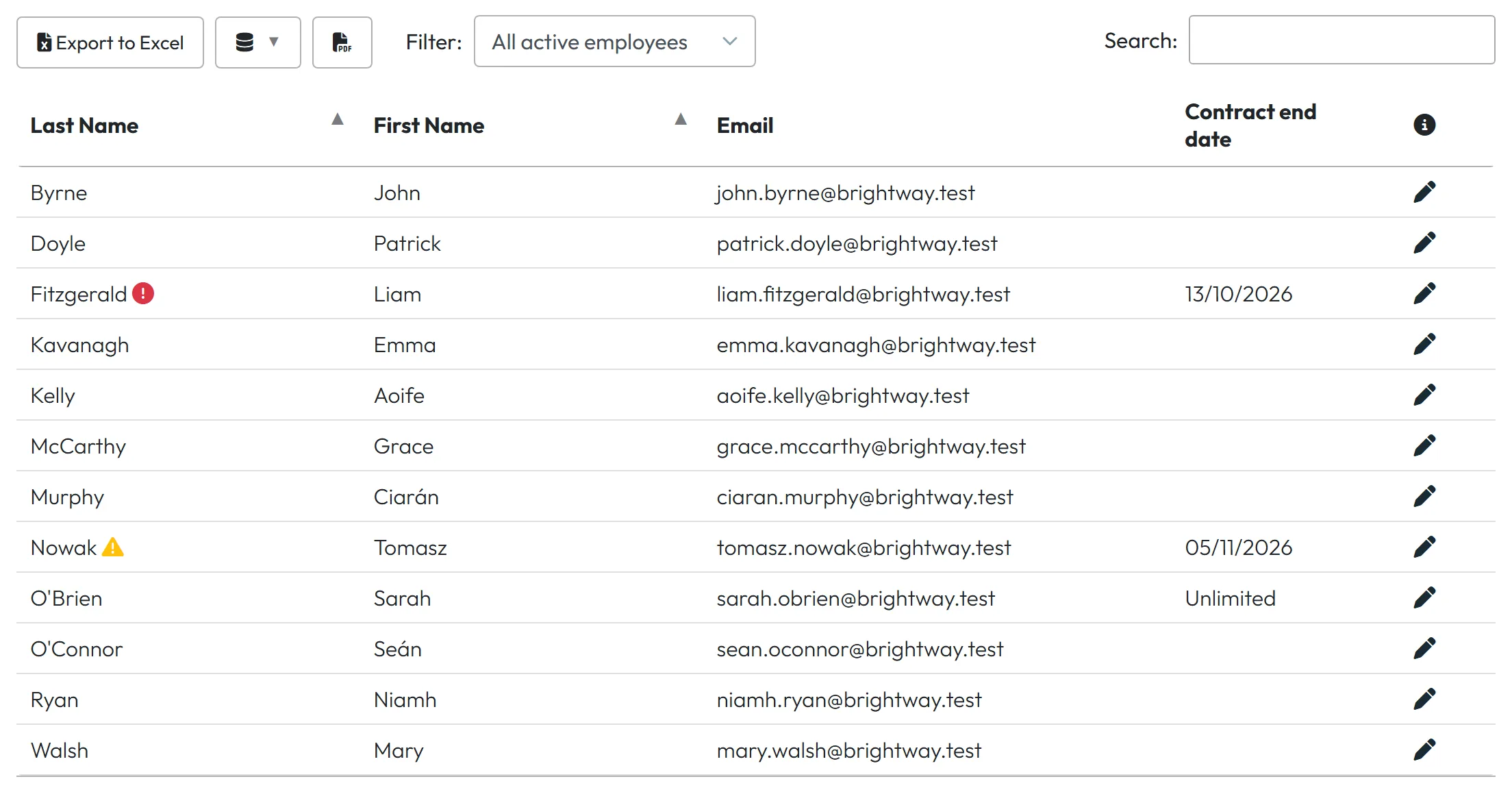
In Employees › Table, a contract that ends within the chosen number of days gets a yellow triangle after the surname; hover over it for Employment contract ends on …. A contract whose end date has arrived gets a red mark. A banner above the tabs sums it up, for example Employment contracts: 1 ending soon, 1 already ended, and the Employees menu item shows a badge with the count.
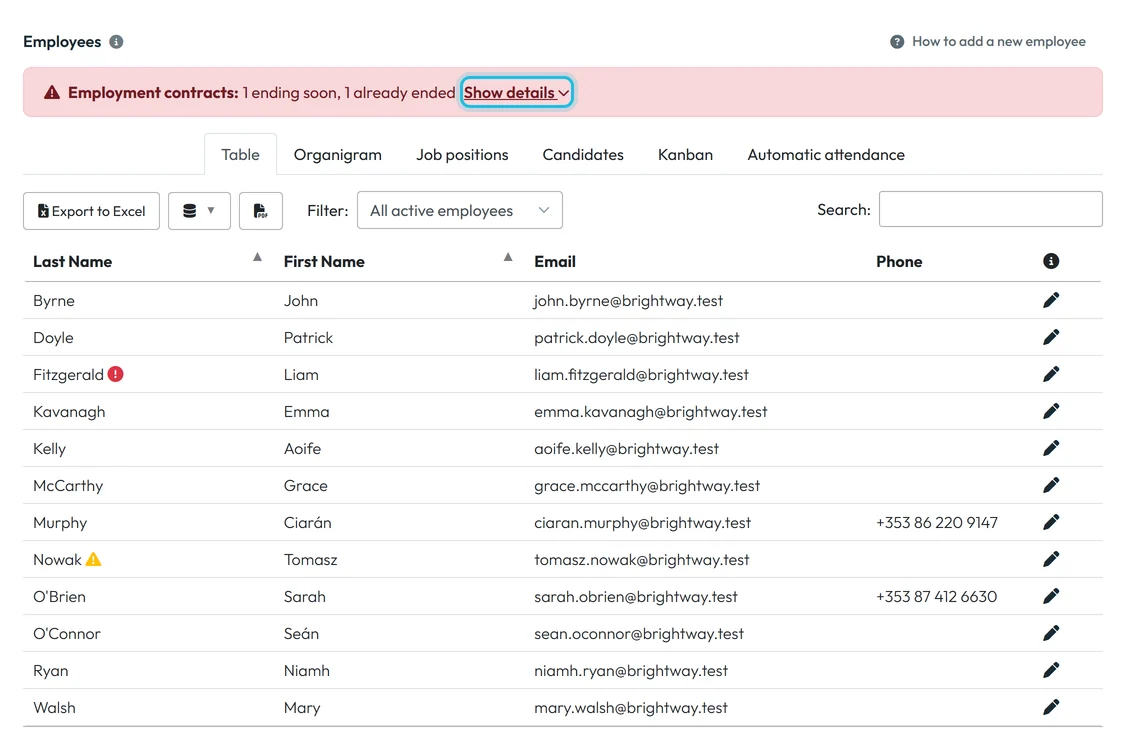
The banner and icons flag ending contracts -
See who and when.
Hover over Show details in the banner. The Contract end dates list shows each name with the date; dates that have passed are red.

Names and dates behind Show details -
Read the e-mails.
Recipients get “[Fresh QR Notification] Employment Contract Ending Soon” once, when the date comes within the chosen number of days, and “Employment Contract End Date Reached” on the day itself. If several contracts are due, one e-mail lists them all. The employee gets nothing.
-
Decide: extend or let go.
The warning stays until you act:
- Extended: change the date or tick Unlimited and click Update. The icons go away, and for a new date both e-mails are sent again at the right time.
- Ended: disconnect the person’s phone if you want to (see unlinking a phone), then delete the profile as in Employee list and filters. Deleted employees drop out of the banner and the badge.

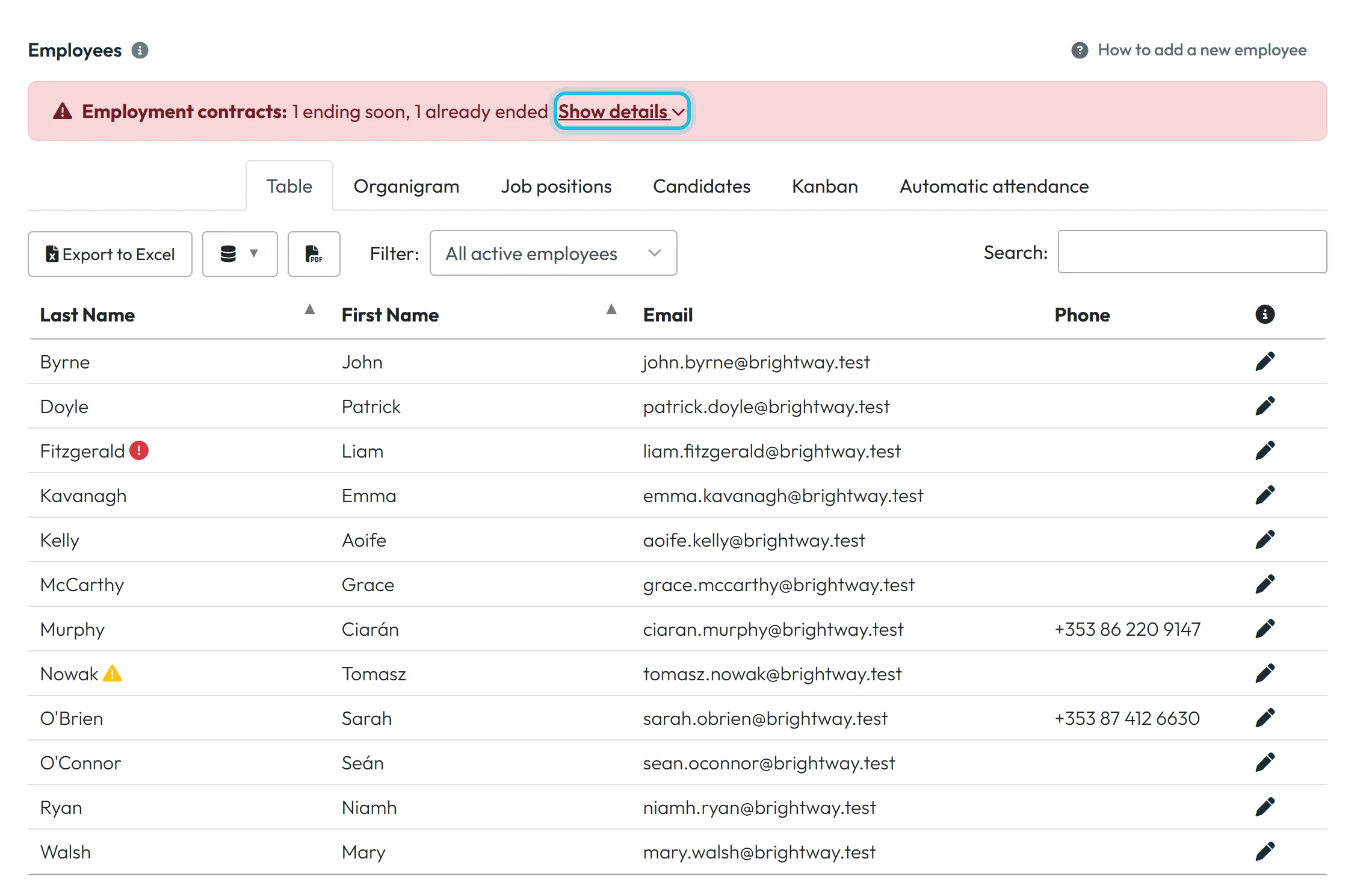

#See all contract dates at once
- The Contract end date columnIn Employees › Table, open the column chooser (database icon) and tick Contract end date. Each row shows the date or Unlimited. Sort by the column to see the next ones first, or export the list with Export to Excel.
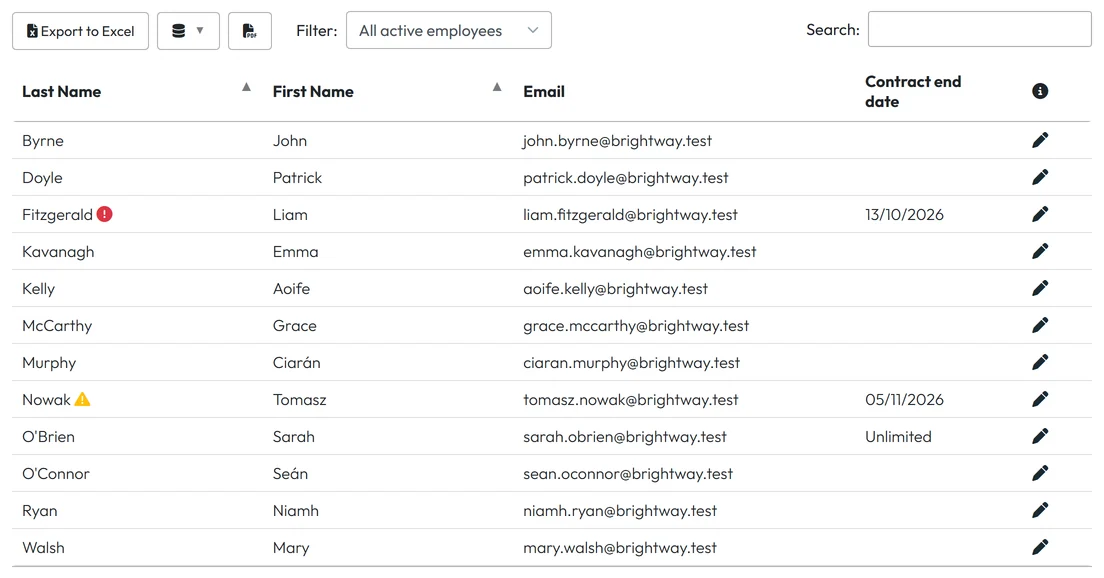
All end dates in one column
#Special cases and tips
- On the last day of the contract
- The end date itself already counts as reached: the list shows the red mark and the second e-mail goes out that day, even though it is still a working day.
- Entering a date that has already passed
- Only the “End Date Reached” e-mail is sent. The “Ending Soon” e-mail needs a future date.
- Nobody got the e-mail
- Check that the rule is on and has recipients. For Direct supervisor, the supervisor needs a user account linked to their profile – see Organigram.
- Candidates
- The rule covers employees only. People on the Candidates tab aren’t included until you make them employees.
- The Event Calendar
- Contract end dates don’t appear in the staff leave calendar. Use the banner or the column.
#Frequently asked questions
Does FreshQR stop the employee from clocking in after the end date?
No. The contract end date is only a reminder. Scans, reports and schedules are not affected.
Does the employee get the e-mail?
No. Only the recipients you choose in the rule.
Does the contract end date affect billing?
No. The date is only a reminder. We bill only employees who worked at least 40 hours in the month; prices are on the pricing page.
I changed the date and got the e-mail again. Why?
A new date starts the reminders again, so you are reminded about the new end date too.
How many days in advance can I set?
Any number from 1 day up. The default is 30 days.
#Related
You are hereEmployment contract end dates
Administrator
Web app (administrator)Mobile app (employee)